AI Runner
The AI Runner performs AI-driven analysis on repository code changes (diffs) associated with a specific build. It evaluates what has changed between revisions to assess potential build risk and generate the AI Build Analysis ReportAI Build Analysis Report is a document-style report integrated into the Build Results in AI Analysis tab. It provides automated build risk assessment along with detailed file-level and code-level insights for completed b….
The AI Runner executes its analysis asynchronously alongside the build workflow, ensuring that AI processing does not block or interfere with core CI/CD execution.
When to Use
Use the AI Runner when you need to:
- Analyze code changes introduced in a build.
- Assess build risk based on recent commits or pull request diffs.
- Generate an AI Build Analysis Report focused on change impact.
- Add AI-based insight without modifying build execution logic.
Parameters
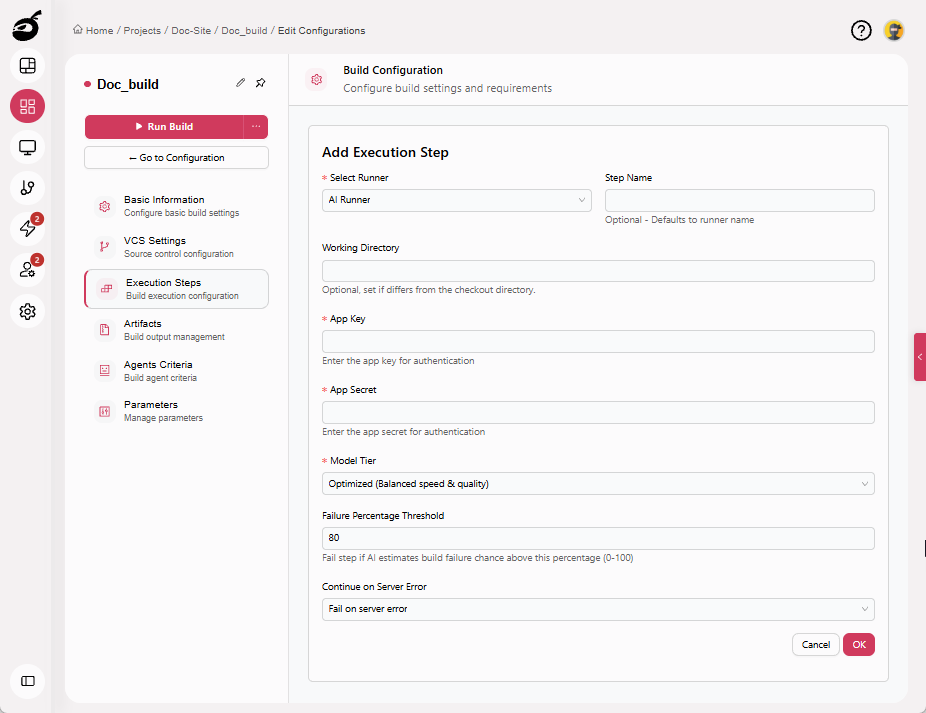
| Parameter | Description |
|---|---|
| Step Name | Optional step name. Defaults to the runner name if not specified. |
| Working Directory | Directory in which the AI analysis runs. Specify only if different from the repository checkout directory. |
| App Key | Application key used to authenticate with the AI service. |
| App Secret | Application secret used for secure authentication. |
| Model Tier | Selects the level of AI analysis: Economy, Optimized, or Best. |
| Failure Percentage Threshold | Build failure probability (0–100) above which the step fails the build. |
| Continue on Server Error | Specifies how the build should behave if the AI analysis fails due to a server-side issue (for example, KenzoAI service unavailability or analysis errors).
|
Typical Use Cases
Common scenarios for using the AI Runner include:
- Evaluating pull request changes before merge.
- Identifying risky code modifications early in the pipeline.
- Adding change-impact awareness to CI workflows.
- Flagging builds likely to fail based on recent code changes.
Example
This example demonstrates how to add an AI Runner to a build configuration.
Scenario
Analyze code changes for every commit on the main branch.
Configuration settings:
- Step Name: AI Code Diff Analysis
- Working Directory: (default)
- App Key:
<configured-app-key> - App Secret:
<configured-app-secret> - Model Tier: Optimized
- Failure Percentage Threshold: 65
- Continue on Server Error: Fail on server error
Limitations
- The AI Runner analyzes only code diffs.
- Requires valid KenzoAI credentials configured by an administrator.
- AI insights are advisory and may not cover highly customized or non-standard workflows.
- Higher model tiers may increase analysis time.
Best Practices
- Place the AI Runner early in the pipeline to detect issues before downstream steps.
- Select the model tier based on required depth and build criticality.
- Review AI findings alongside build context and human judgment.
- Monitor analysis results over time to identify recurring risks or patterns.
- Use failure thresholds carefully to avoid blocking pipelines unnecessarily.