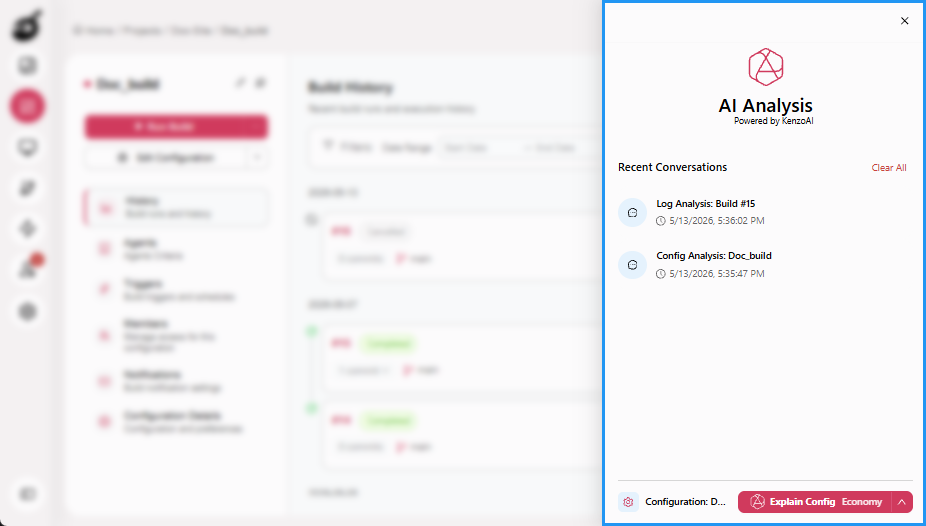
BuildNinja AI Side Panel
The BuildNinja AI Side Panel is a persistent, global, context-aware assistant available throughout the application. It helps users analyze builds, understand configurations, and interact with AI-powered features without leaving their current workflow. The panel adapts to the user’s current screen and automatically surfaces relevant actions, making it easier to troubleshoot issues and understand complex information. You can open the AI Side Panel in the following ways:
- Click the floating handle on the right edge of the screen.
- Use the keyboard shortcut Alt + A.
The AI Side Panel detects where you are in the application and surfaces actions relevant to that context:
- Build Details: Automatically offers the Analyze Logs action to help identify likely root causes of build failures.
- Build Configuration: Automatically offers the Explain Config action to help understand build configuration parameters and structure.
These actions serve as entry points, after which you can ask follow-up questions or request deeper explanations.
In addition, the AI Side Panel maintains a history of recent AI sessions with timestamps and status indicators, supports cancelling active requests and clearing individual or all sessions, and provides a resizable interface whose width is saved for future use.
The AI Side Panel also allows users to select the Model Tier used for analysis. Model tiers control the balance between response speed, cost, and analytical depth, enabling users to choose faster lightweight analysis or deeper, more comprehensive reasoning depending on their needs.